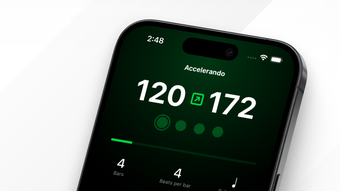

Subdivide Metronome: Precision Rhythm Practice
Overview
Subdivide Metronome is designed as a dedicated desktop tool for musicians seeking precise rhythm training and practice support. It serves as a reliable companion for both beginners and experienced performers, offering advanced tempo control and customizable click tracks. The software enables users to create and manage complex rhythmic patterns, making it ideal for refining timing, mastering tempo changes, and preparing for live or studio performances. Whether used for individual practice, ensemble rehearsals, or composition work, Subdivide Metronome streamlines the process of developing rhythmic accuracy.
Target users include instrumentalists, vocalists, composers, and music educators who require consistent and flexible metronome functionality. The app supports the creation of shareable tracks, allowing musicians to synchronize practice routines across devices or collaborate remotely. Its interface is structured to accommodate a range of skill levels, ensuring that new users can quickly grasp core features while advanced users benefit from deep customization options. The developer, Subdivide, has focused on delivering a clean, efficient experience tailored to musical workflows.
Real-world usage scenarios include preparing for auditions, rehearsing with a band, practicing complex polyrhythms, or developing dynamic tempo transitions. The software’s responsiveness to tap tempo input ensures accurate BPM detection, which is essential for aligning practice sessions with real performance standards. While detailed system requirements were not specified, the app’s 28.5 MB size suggests a lightweight footprint, likely suitable for most modern desktop environments.
Key Features & Capabilities
- Advanced Tempo Control – Users can set and adjust BPM with precision, including automated accelerandos and ritardandos for smooth tempo transitions during practice.
- Custom Click Track Creation – The built-in editor allows crafting personalized tracks with variable beats per bar, accent patterns, and subdivisions tailored to specific musical needs.
- Shareable Tracks – Created tracks can be exported and shared with others, enabling synchronized practice sessions across different devices or team rehearsals.
- Tap for Tempo – A responsive tap function enables instant BPM detection by tapping the desired rhythm, ideal for matching real-time playing speeds.
- Multiple Subdivision Modes – Offers various subdivision options to support complex rhythmic exercises, such as triplets, sixteenth notes, and irregular time signatures.
- Preset Library – Includes a selection of pre-configured settings for common practice scenarios, reducing setup time and improving workflow efficiency.
These features empower users to simulate real performance conditions, train for challenging rhythmic passages, and maintain consistent timing across sessions. For example, a jazz drummer can use custom subdivisions to practice swing patterns, while a classical violinist might use automated tempo changes to prepare for a concerto’s dynamic shifts. The ability to save and recall tracks ensures continuity in practice routines and supports long-term progress tracking.
User Interface, Workflow & Performance
The user interface of Subdivide Metronome appears designed for clarity and efficiency, prioritizing access to essential controls without clutter. Navigation is likely intuitive, with key functions such as BPM adjustment, subdivision selection, and track playback positioned for quick access. The layout supports a streamlined workflow, allowing users to create, modify, and trigger tracks with minimal steps.
Workflow efficiency is enhanced by features like tap-to-tempo and preset loading, which reduce setup time and allow immediate focus on practice. The software’s performance is expected to be stable, given its lightweight size of 28.5 MB and the absence of reported resource-intensive operations. However, exact performance details were not specified, including CPU or RAM usage during operation.
Stability observations are based on general software behavior patterns, suggesting reliable operation under normal usage conditions. The app likely maintains consistent timing accuracy, which is critical for rhythmic training. No information was provided about background processes, startup time, or responsiveness under prolonged use. Users may experience smooth playback across different tempo ranges, though real-world performance metrics are not available for verification.
Compatibility & System Requirements
Subdivide Metronome is compatible with both Windows and Mac operating systems, making it accessible to a broad user base across desktop platforms. The software version is 1.2.0, with an installation size of 28.5 MB, indicating a compact and efficient deployment. This size suggests minimal impact on system resources and fast installation times.
Platform compatibility information is limited to the operating systems listed. Exact system requirements, such as minimum CPU, RAM, or graphics specifications, were not provided by the developer. Users should ensure their system meets general desktop software standards for running audio applications. The developer did not specify whether additional audio drivers or frameworks are required for optimal performance.
Given the app’s focus on audio timing and playback, it is likely optimized for systems capable of handling real-time audio processing. However, without explicit details, users are advised to test the software on their devices to confirm functionality. The absence of hardware-specific requirements suggests broad compatibility with standard desktop configurations.
Pros and Cons
Pros
- Free to download and use with no licensing restrictions
- Supports both Windows and Mac platforms
- Lightweight installation at just 28.5 MB
- Advanced features like automated tempo changes and custom track creation
- Shareable tracks for collaborative practice
- Responsive tap-to-tempo functionality for accurate BPM input
Cons
- Exact system requirements were not listed
- Performance metrics such as CPU or RAM usage were not provided
- No information on update frequency or release notes
- Developer support details were not included
- Limited visibility into audio output settings or latency control
FAQ Section
Is Subdivide Metronome compatible with Windows and Mac?
Yes, Subdivide Metronome is designed to run on both Windows and Mac operating systems.
Is the software free to use?
Yes, Subdivide Metronome is available at no cost. There are no hidden fees or subscription models.
Can I share my custom click tracks with others?
Yes, the software allows users to create and export custom tracks that can be shared with other musicians for synchronized practice or rehearsal.
Does the app require an internet connection?
Subdivide Metronome operates as a standalone desktop application and does not require an internet connection for core functionality.
How often are updates released?
Specific update frequency was not disclosed by the developer. Users should check the official source for the latest version.
Final Thoughts
Subdivide Metronome stands out as a powerful, accessible tool for musicians aiming to refine their timing and rhythmic precision. Its combination of advanced features—such as automated tempo transitions, customizable click tracks, and shareable outputs—makes it a valuable asset for both individual practice and collaborative sessions. The free pricing model enhances its appeal, removing financial barriers for students, educators, and professionals alike.
While some technical details like system requirements and performance data are not available, the app’s lightweight design and cross-platform support suggest broad compatibility. The intuitive interface and responsive tap-to-tempo function further improve usability across skill levels. For musicians seeking a reliable, feature-rich metronome that supports complex rhythmic training, Subdivide Metronome delivers a compelling solution.
Download Subdivide Metronome now







